
YouLikeHits.com Removed Facebook Likes Button On Their Website.... We are working on an Alternate Method. Please Kepp Yourself Updated with us

Facebook is king of Social Networks and today people from all around the globe are using it. Some are using it for fun, some are using it for communication, and some are using it for Business Promotions. One popular feature of facebook is that is allows its users to create multiple pages. Four years ago when i joined facebook, Promoting Facebook pages and Getting likes wasn’t a big deal, Sending Links in Chat, Inviting Friends and PnP (Promote and Get promoted) seemed to work fine at that time. and usually, we get about 20-30 likes on a daily basis by using these kind of techniques. But none of them works now. Now-a-days it is a bit tough to get likes on your fanpage. Admin of Popular fanpages aren’t interested PnP. Sending Links in Chat Box is annoying and almost none of your friend whom you invite likes your page. For this reason some people used “Auto-Likers” but, Auto-Likers had ruined their Profile and Fanpage. So, many old friends of mine asked from me that “Is there any trick to get Likes on Facebook Page?” or “Can we get likes on our facebook page without using Auto-Likers?” and my reply was, “Yes! There Is.” So Here is the Trick to Get Hundreds and Thousands of Facebook Likes for FREE!
Here, in this post I am Posting a little bit tricky method, But i am also working on Another (Easy) Method. You can Subscribe us VIA EMAIL (For Free) to get our posts in your Inbox.
Method 1: How to Get Likes on Facebook Fanpage for Free (Tutorial):
- Click here and create a account. (Skip first 4 Steps if you already have an account)
- Click on "Skip Ad" button present on the Top-Right side of the Page
- Enter a Username, email, Password and Conformation Code (Given Below Dailog Box)
- After SignUp, and Claim free 25 Points.
Now Here is the Trick:
- Search for FB Likes in the Left Sidebar.
- Hover the arrow near FB Likes label present on the Right Sidebar.
- Settings icon will appear there, Click on it
- Now, Give Name, URL, and Select Category of Your Facebook Fanpage. and Click on Add Site/Page
- After that, a message of Success will appear there. Click on Refresh Link Below the message.
- Now Click on Continue Setup Button.
- Now a Button will appear asking “Download .HTML Like Button”. Click on It. (For me it was sface46795.html, But your filename can be different)
- Now Click Here, Click on “Skip Ad”, And Click on “Sign Up” Button present on the Right Side (Sidebar)
- Then on Signup Page, Choose on “I will choose your free subdomain“. (In Subdomain, Write anything that you like)
- Enter your details.
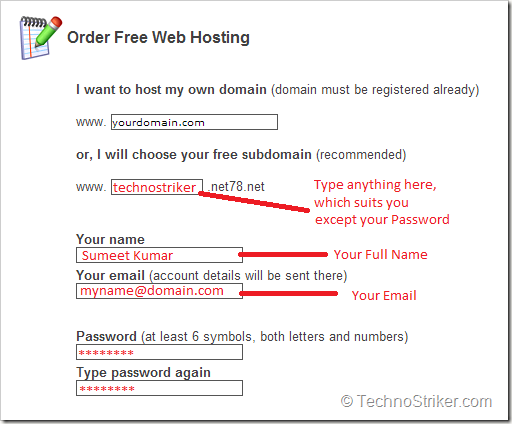
- Open Your Email, You’ll find an email from 000webhosts.com with subject of “Confirm your Registration”.
- Open That Email, You’ll find a confirmation link in it. Click on it.
- After Confirming your account, You’ll find an option of “Go to CPanel”, Click on it - (If you cant see Go to CPanel Option, then refresh the page)

- Search for the option of FileManager on the Page
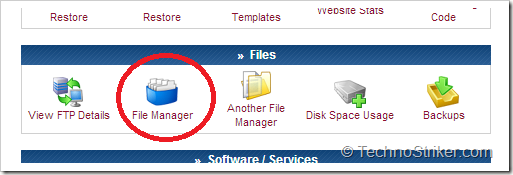
- A Web Page will open, Where username will be present already. Just Enter your Password there. And click on Continue.
- After Logging in. Click on Public HTML

- After that Click on Upload Button on the top.
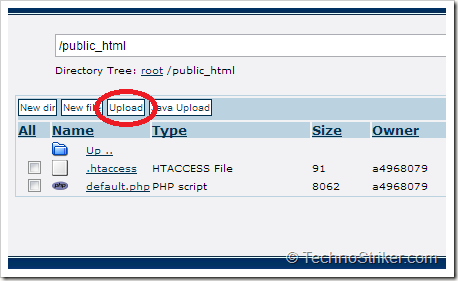
- Select the file that you have Downloaded previously From YoulikeHits.com (For me, it was sface46795.html). And click on ü Button

- Once File is Uplaoded, Go Back to YoulikeHits.com and Click of FB Likes Setting Icons on The Sidebar

- Click on Continue Setup under Main FB Settings
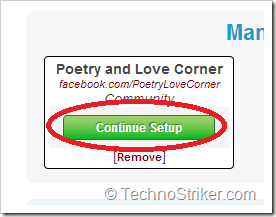
- Now Head to Step 3, And Enter THE URL in Text Box.
e.g ( YourSubDomain.net78.net/YouLikeHitsFile.html. In my Case, My SubDomain (That i selected on 000WebHosts.com) was TechnoStriker and YouLikeHits Filename was sface46795.html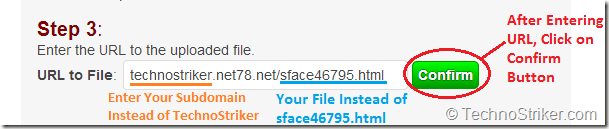
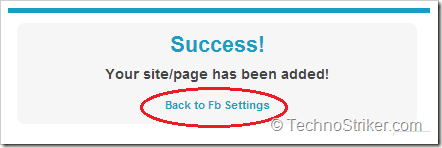
- Now a Success Message will appear. Click on “Back to FB Settings” below this message.
- Choose the Payout of Your Choice (more payout, more quickly your name will appear in the list).
- A Message will appear which reads “Payout Changed to “X” Points.” (Where “X” is the Payout of your Choice”)
- Earn More Points by Tweeting, Following Others, +1, Circles etc and spend them to get more Facebook Fanpage.

PS) This one is a bit tough Tutorial, I am also working on a easy way to get facebook likes for free, and soon i will post it too. Please keep yourself Updated with us by Subscribing our Posts in your Inbox (Free) OR RSS. You can also like Page on Facebook, Circle our page on Google+ or Follow us on Twitter to get updated with us. (They are free too)
Comments
Post a Comment