
Change Windows 7 Logon Screen without using any software - See more at : http://www.techtriker.blogspot.com
Win7logo
Windows 7 is The most popular OS of Microsoft after windows XP. And like XP, most people like to tweak, modify and customize it. They love to change its boot screen, color, icons, logon screen etc. But do you know that you can customize its LOGON SCREEN without using any kind of software. If you don’t know about this tweak, then my this post is definitely for you. See the screenshot below.


So, If you want to make this screen, Then here is the tutorial.

Now, Before following the tutorial, Grab that picture that you  want to put on logon screen (But make sure that it is in JPG format and its size smaller then 250 KB).Or click here for a sample picture.

1.  Download the following file.
2.  Go to the location where you’ve saved the file and double click on it.
3.  Click on “yes” button (If asked for permission).
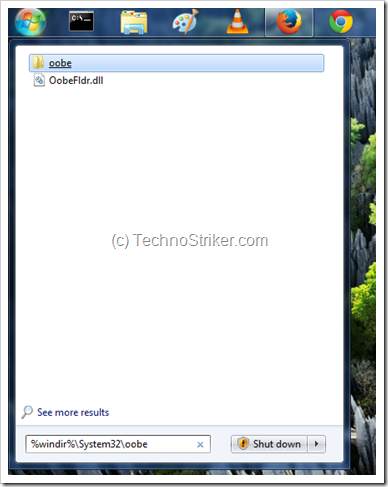
4.  Now, click on start button and type the following in search box.

%windir%\System32\oobe
5.  Click on oobe folder.
OOBE
7.  Inside oobe folder, create a new folder, and name it as info.
8.  Now, Open info folder, create another new folder named as backgrounds.
9.  Inside backgrounds folder, Put the image that you want to set as your default logon screen and rename the picture as “backgroundDefault”.
10. Logout and re-login to enjoy your new Logon Screen.

So, This is it… Hope to see you again, And ya, Don’t forget to get our latest articles (for free) by Liking us on facebook or by following us on email.  And don’

[Logon Screen Image by Fractalizer on neowin forum.]

Comments

Popular posts from this blog

The Father of Computer :- Charles Babbage

Hey Guys ! today I want to tell u About the Father of the Computer : - Charles Babbage . Charles Babbage,  FRS  (26 December 1791 – 18 October 1871) was an English  polymath . [1]  He was a mathematician, philosopher, inventor and mechanical engineer, who is best remembered now for originating the concept of a programmable computer. Considered a " father of the computer ", [2]  Babbage is credited with inventing the first  mechanical computer  that eventually led to more complex designs. His varied work in other fields has led him to be described as "pre-eminent" among the many polymaths of his century. [1] Parts of Babbage's uncompleted mechanisms are on display in the  London Science Museum . In 1991, a perfectly functioning difference engine  was constructed from Babbage's original plans. Built to  tolerances  achievable in the 19th century, the success of the finished engine indicated that Babbage's machine woul...

The World comes near you; The Samsung Invented The New Galaxy VR

This device shows the Virtual Reality Means the world of Mobile comes near you WoW!!! Amazing Redefine what a phone can do We're completely changing how you'll share experiences and memories. We're doing that by shattering the boundaries of what a phone can do. And it's the biggest thing to happen to phones. Ever This device is compatible with Samsung Galaxy s7 or else but remember that the device have the Gyro Sensor .  Let's read what samsung has written About it's Compatibility  Compatibility Gear VR works seamlessly with Galaxy smartphones*. All you need to do is slip in your phone and you're free to take on the world and beyond. Design To reach new levels, a comfortable headset is a must. That’s why with a wider interface, Gear VR is now 19% lighter compared to the previous model. And with its larger touchpad, you get easy and accurate control. *Without Galaxy smartphone. The Picture are there with the features Content There are no bad seats at this the...

How to make a picture in photoshop cs5

Step1: Open run program by clicking windows+R or by going to start and opening or searching run. Step2: Write on the blank "Photoshop"   Step3: Open Open Bar by clicking CTRL + O or by going on side bar and b  Then Click on the Maintioned Icon Then Drop it Start To Last Then Make It's Size Then Make it ok then save it.....